Best Video Editing Institute in Delhi NCR

Video Editing Course in Delhi (With Actual Practical Classes)
Get trained at Delhi’s most trusted video editing course and turn your passion into a career — editing for YouTube, Reels, movies, ads, and beyond.

Years of MAAC Legacy

0 +

Students Trained

0 +

Placement Rate

0 %

Industry Partners

0 +

Interested in the Course? Get in Touch

This field is required.

Why Choose a Video Editing Course in Delhi
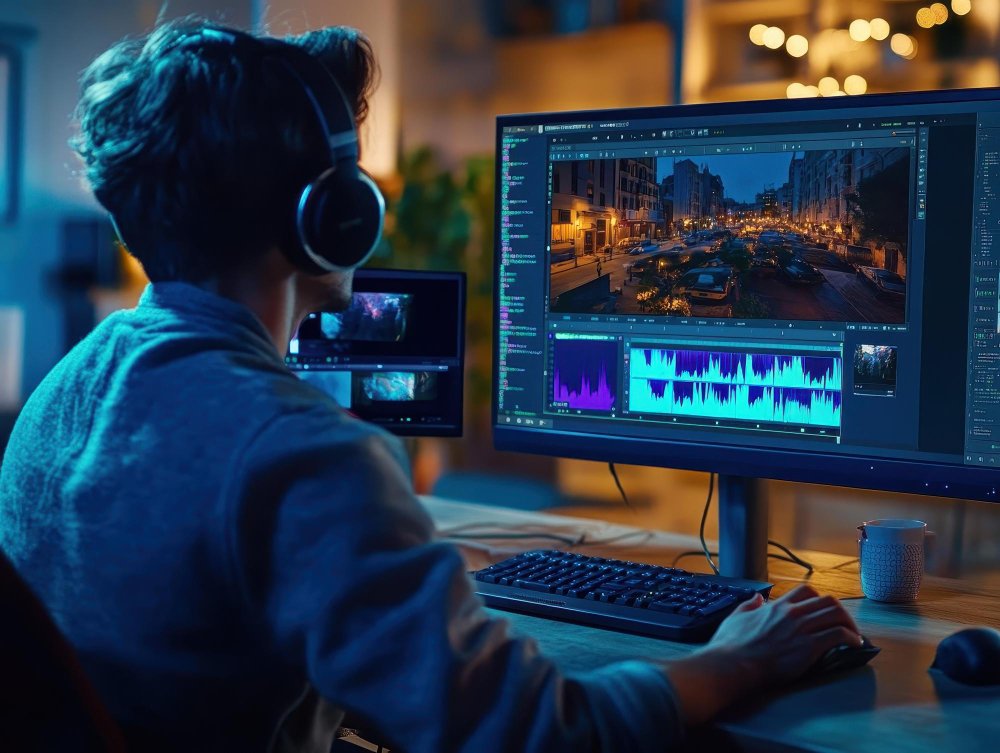
If you want to work in editing — YouTube, Reels, ads, podcasts, corporate videos, whatever — you need real practice, not just theory. A video editing course in Delhi trains you on Premiere Pro, After Effects, transitions, color correction, audio syncing, and motion graphics — the real stuff, not just theory. It’s also close by if you’re in Noida, Gaur City, or Greater Noida West.

High Demand

Everyone's making videos. Not everyone knows how to edit them well — that's where you come in.

Creative Freedom

No two edits have to look the same. Build a style that's unmistakably yours.

Great Earnings

Charge per project, join a studio, or work from your laptop at 2 AM — your call.

Endless Opportunities

Movies, YouTube, ad campaigns, wedding films — editors touch it all.

What You'll Learn in This Video Editing Course

Software Covered Across the Video Editing Course
  • Adobe Premiere Pro
  • Adobe After Effects
  • Adobe Audition
  • DaVinci Resolve
  • CapCut

Our Video Editing Courses in Delhi NCR

Looking for the right video editing course in Delhi? Our programs are built for students, freelancers, and job seekers across Delhi NCR who want practical, career-ready skills — not just theory. You’ll work with Adobe Premiere Pro, motion graphics, Reels editing, and real cinematic workflows, with classes easily accessible from Noida Extension and Greater Noida West.

Beginner Course

3 Months

Perfect for beginners who want to start their journey in video editing.

Advanced Course

6 Months

Learn advanced editing, motion graphics and professional techniques.

Professional Diploma

9-12 Months

Complete professional training with portfolio, placement & industry exposure.

As a trusted name for video editing training in Delhi NCR. We offer a complete video editing course in Delhi with hands-on projects, portfolio support, and expert mentorship. Students from Delhi NCR areas, Noida West / Greater Noida West (Gautam Buddha Nagar), Meerut, Bulandshahr, Hapur, Shamli, and Muzaffarnagar can join too, with focused modules like Premiere Pro, After Effects, and YouTube editing designed for creator-focused careers.

Video Editing Course — Full Curriculum
This video editing curriculum covers the full post-production pipeline — from raw footage to final delivery. Each module is built around hands-on practice. By the time you finish, you will have a portfolio of real edited pieces, not just theoretical knowledge.

Topics Covered

Software / Tools

What is video editing — history and creative role

Adobe Premiere Pro (interface orientation)

Understanding frame rates (24fps, 30fps, 60fps) and resolution (HD, FHD, 4K)

Adobe Premiere Pro

Video file formats: MP4, MOV, MXF, ProRes — when to use what

Premiere Pro / File settings

Codecs explained: H.264, H.265, DNxHD

Premiere Pro / Media Encoder

The post-production pipeline: shoot → ingest → edit → colour → audio → export

Premiere Pro (full pipeline overview)

Setting up a project: naming conventions, folder structure, proxy workflow

Premiere Pro Project panel

Importing media, creating sequences, understanding the timeline

Premiere Pro Timeline

Keyboard shortcuts every editor must know

Premiere Pro

Topics Covered

Software / Tools

The 5 types of cuts: straight cut, jump cut, L-cut, J-cut, match cut

Premiere Pro

Pacing and rhythm — how editing controls emotion

Premiere Pro

Continuity editing and the 180° rule

Premiere Pro

Multi-camera editing: syncing multiple angles

Premiere Pro (Multi-Camera Source Monitor)

Assembling a rough cut from raw footage

Premiere Pro

Trimming tools: Ripple, Roll, Slip, Slide edits

Premiere Pro Trim Monitor

Working with B-roll and cutaways

Premiere Pro

Creating a 60-second short film edit (Live Project 1)

Premiere Pro (graded project)

Topics Covered

Software / Tools

Built-in transitions: dissolve, wipe, zoom, spin

Premiere Pro Effects Panel

When (and when not) to use transitions — creative vs. cheap

Premiere Pro

Video effects: blur, distortion, stylize, transform

Premiere Pro Effects

Nested sequences and pre-composing

Premiere Pro

Speed ramps: fast motion, slow motion, freeze frames

Premiere Pro Time Remapping

Creating a dynamic Instagram Reel / YouTube Short (Live Project 2)

Premiere Pro + CapCut

Intro to CapCut: mobile-first editing for social media

CapCut

Trending transitions workflow for Reels and Shorts

CapCut / Premiere Pro

Topics Covered

Software / Tools

Creating text layers: font selection, sizing, tracking

Premiere Pro Essential Graphics

Kinetic typography — making text move with meaning

Premiere Pro / After Effects

Lower thirds: on-screen names, captions, location tags

Premiere Pro Essential Graphics

Title sequences — intro and outro design

Premiere Pro / After Effects

Animating text with keyframes inside Premiere Pro

Premiere Pro (keyframe animation)

Using Motion Graphics Templates (.mogrt files)

Premiere Pro (.mogrt templates)

Essential Graphics panel workflow

Premiere Pro

Exporting captions and subtitle files (SRT)

Premiere Pro Captions panel

Topics Covered

Software / Tools

Audio fundamentals: sample rate, bit depth, levels (dBFS)

Adobe Audition

Dialogue cleanup: reducing room noise, hiss, echo

Adobe Audition (Noise Reduction, DeReverb)

EQ, compression, and limiting explained simply

Adobe Audition Essential Sound panel

Adding and mixing background music without overpowering dialogue

Audition / Premiere Pro Audio Track Mixer

Sound effects (SFX): sourcing and layering

Audition / free SFX libraries

Syncing external audio (from a recorder) with video

Premiere Pro / Audition (PluralEyes concept)

Podcast audio workflow: recording, cleaning, exporting

Adobe Audition

AI-powered audio cleanup and transcript-based editing

Descript

Topics Covered

Software / Tools

Colour correction vs. colour grading — the difference

Premiere Pro Lumetri

Reading scopes: Waveform, Vectorscope, Histogram

Premiere Pro / DaVinci Resolve

Primary correction: exposure, white balance, contrast

Premiere Pro Lumetri

Secondary correction: HSL qualifier, masking

Premiere Pro Lumetri / DaVinci Resolve

Lumetri Color panel deep dive

Premiere Pro

Creating a cinematic look — LUTs explained and applied

DaVinci Resolve (LUT browser)

Matching colour across multiple clips and cameras

DaVinci Resolve (Still grabs, Gallery)

DaVinci Resolve workflow: nodes, Power Windows, Fusion tab intro

DaVinci Resolve

Colour grading a 2-minute short film (Live Project 3)

DaVinci Resolve (graded project)

Topics Covered

Software / Tools

After Effects interface: compositions, layers, timeline

Adobe After Effects

Keyframe animation: position, scale, rotation, opacity

After Effects

Easing and graph editor — making motion feel natural

After Effects Graph Editor

Shape layers and path animations

After Effects

Text animation presets and custom animators

After Effects

Green screen / chroma key removal and compositing

After Effects Keylight + Lumetri

Tracking: point tracking, planar tracking (mocha AE)

After Effects / mocha AE

Particle systems and basic simulations

After Effects Particular / CC Particles

Intro to AI video generation and cleanup

Runway ML

Integrating After Effects comps into Premiere Pro (Dynamic Link)

Dynamic Link (AE + Premiere Pro)

Topics Covered

Software / Tools

Export settings for YouTube (4K, 1080p, bitrate recommendations)

Adobe Media Encoder

Export for Instagram Reels and Stories (9:16, size limits)

Media Encoder

Export for broadcast / TV (delivery specs, safe zones)

Media Encoder / Premiere Pro

Exporting for client review: H.264 proxy, Vimeo review links

Premiere Pro / Vimeo

Adobe Media Encoder queue and batch export

Adobe Media Encoder

Archiving projects: media management, trimming projects

Premiere Pro Project Manager

Creating a YouTube channel trailer (Live Project 4)

Premiere Pro + Media Encoder

Building your first freelance delivery package

Premiere Pro

Topics Covered

Software / Tools

Portfolio structure: what editors actually put in a showreel

Premiere Pro / DaVinci Resolve

Building a 90-second showreel from course projects

Premiere Pro (showreel edit)

Setting up a freelance profile (Fiverr, Upwork, LinkedIn)

LinkedIn / Behance

Pricing your work: how to quote editing projects

Spreadsheet / rate card template

Client communication: brief, revision rounds, final delivery

Email / Google Docs brief templates

Copyright, music licensing, and stock footage — staying legal

Industry sectors: film, ad agencies, OTT, corporate, wedding

Mock interview and portfolio review session

Portfolio review

Industry visit / guest lecture (Delhi NCR professionals)

Internship support: CV, reel, and placement assistance

MAAC Placement Cell

Why Students Trust MAAC in Delhi NCR

Industry Expert Faculty

Modern Labs with Latest Software

Live Projects & Practical Training

Placement Support

Flexible Batches (Weekdays/Weekend)

Convenient Location
Near Gaur City

Student's Testimonials

Noida Extension's #1 Video Editing Institute

Training Certification

MAAC Certificate for Professional Video Editing Training

After completing the course, students receive a certificate from MAAC that reflects their training in professional video editing tools and workflows. The certificate course in video editing also shows that the student has completed practical assignments and editing projects.

  • Certificate issued by MAAC after successful course completion
  • Based on practical training, assignments, and project work
  • Can be added to your portfolio when applying for editing roles
Placement Support

Companies Around the World That Hire Video Editors

Video is now used everywhere, from entertainment to marketing. After completing an advanced video editing course, students can explore opportunities in different industries where editing skills are needed to create films, ads, online content, and branded videos.

  • Film and television production companies
  • Advertising and digital marketing agencies
  • YouTube channels and online content platforms
  • Corporate media and brand communication teams
  • News, broadcasting, and media networks
  • Event production and wedding film studios

Career Opportunities after Video Editing Course

Complete the video editing course in Delhi at MAAC, and you’re ready to work across industries or start freelancing on your own.

Average Salary for Video Editor in Delhi NCR

₹15,000 - 50,000+ Per Month

(Based on skills and experience)

Delhi NCR #1 Video Editing Course Institute

Got Questions About the Course? We've Got Answers

What are the video editing course fees in Delhi?

The video editing course fees in Delhi depend on which program you choose — beginner, advanced, or the full diploma. Reach out and we'll walk you through the exact fee breakdown for the track you're interested in.

Is this the best video editing institute in Delhi NCR for beginners?

Yes, we're considered one of the best video editing institutes in Delhi NCR for people starting fresh. Most students who join have zero prior experience, and the beginner course is built to take you from scratch to confident.

Do you teach a Premiere Pro course in Delhi?

Yes, our Premiere Pro course in Delhi is the backbone of the program. Alongside Premiere Pro, you'll also pick up After Effects, DaVinci Resolve, and CapCut, since editors today need to move between tools.

Is there placement support with this video editing course?

Yes, this video editing course with placement support includes guidance and industry connections once you finish. We won't promise a guaranteed job — no institute honestly can — but the projects and portfolio you build genuinely help when applying.

Do you give a certificate after the video editing course?

Yes, this video editing course with certificate means you walk away with a completion certificate you can add to your resume or portfolio when applying for editing roles or freelance work.

Can I start freelance video editing after this course?

Yes, a lot of students go straight into a freelance video editing career right after finishing, using the portfolio and real projects they built during the course to land their first clients.

Do you cover YouTube and Reels editing specifically?

Yes. Our YouTube video editing course in Delhi covers everything from long-form YouTube content to a dedicated Reels editing course in Delhi, plus ads and corporate videos — social media editing gets special focus since that's where most beginners land paid work first.

Join Our Video Editing Training

Guranteed Job Placement Program

  • Expert-led training
  • Hands-on projects
  • Globally recognized certification

Ready to Turn Your Passion Into a Video Editing Career in Delhi NCR?

Want to learn editing but don’t know where to start? This is it — a video editing course in Delhi that actually teaches, not just hands out a certificate.